
It's the Monday after your studio's Steam Playtest weekend. The survey says the second area is too hard. On Discord, one thread calls the crafting menu confusing and another says the game is great.
Your designer can't say whether the people who complained ever reached the second area, or how many testers quit before the crafting menu came up.
This guide gives you a short list of events to plan before the playtest, who adds them, and how to read them next to the feedback. In short: track where first sessions stopped, which features testers found or missed, where runs ended in a death or a quit, and who came back, then read those events beside what testers told you.
Why the survey and Discord leave you guessing
Feedback tells you what testers say. It doesn't tell you what they did. A survey answer about the second area reads the same whether the tester fought there for an hour or quit at the entrance.
The loudest testers are also not all testers. The people who post on Discord are usually the most engaged ones. Testers who closed the game during the tutorial rarely fill in the survey. That silent group is often the one you most need to hear about. Feedback alone never shows it.
Events give you a second source. They record what each tester did in the build: where they went, what they used, where they stopped. They don't replace the survey, Discord or a call with a tester. The events record what happened, and the feedback tells you how it felt. You need both to work out why.
1. Write down the decisions the playtest has to inform
Start with two to four decisions the playtest should help you make. The producer or lead designer usually writes them, in plain words. For example:
- Is the first session too long before the game gets interesting?
- Can testers find the crafting menu without being told?
- Is the difficulty spike on the second floor real, or a few loud complaints?
- Do testers want to play a second session?
This list keeps the tracking short. Each event you add must help answer one of these decisions. If it doesn't, cut it. A long list of events takes the developer more time to add, and it gives the team more numbers to argue about after the weekend. For broader event planning beyond a playtest, see how to plan your game events.
2. Pick a short list of playtest events
Group the events by the question each group answers. The four groups below match the four example decisions.
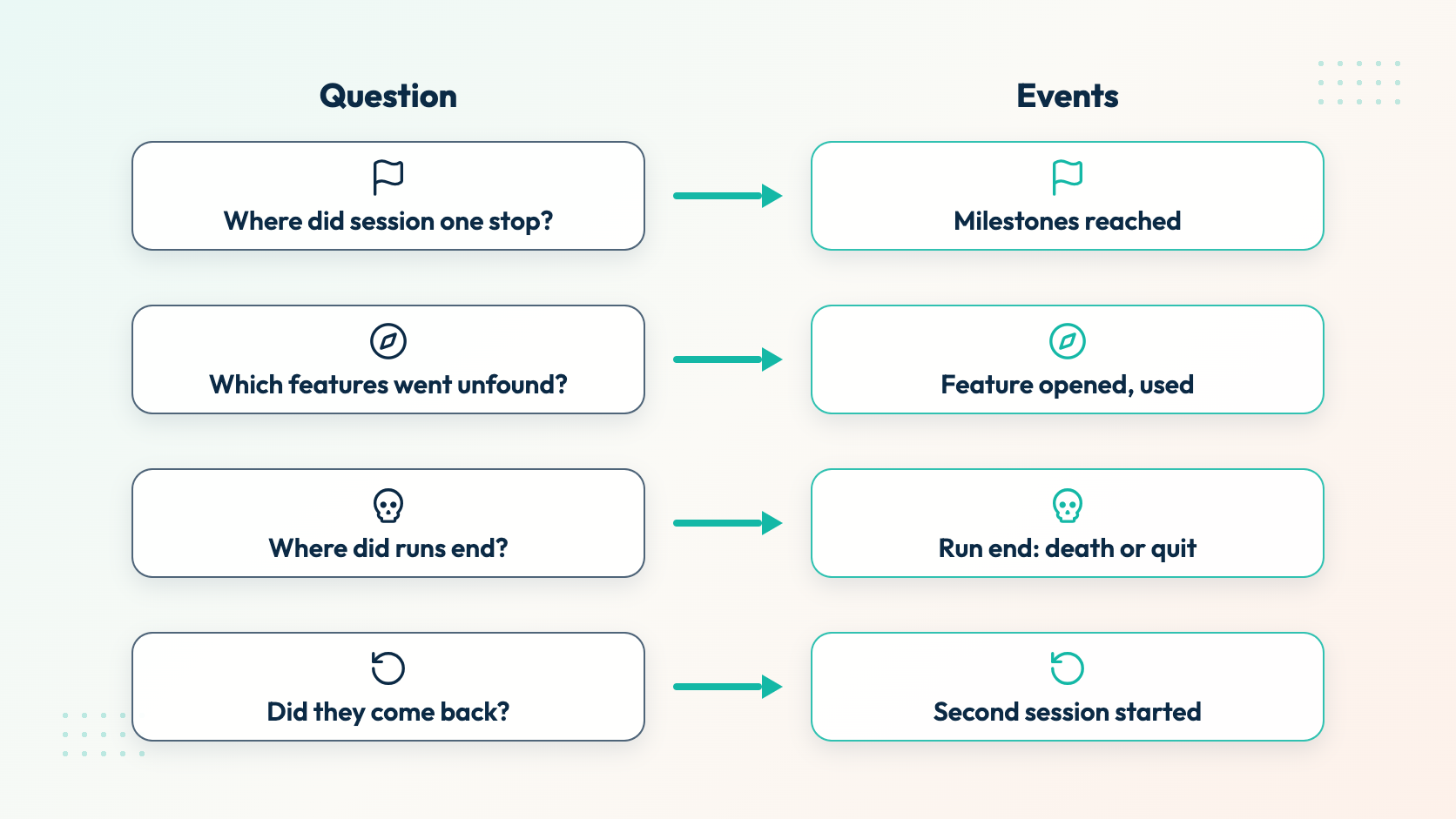
Each playtest question gets its own short group of events.
Every event should carry three things: the build version, a pseudonymous player ID and a session ID. The player ID is a random ID the game creates, not a name. With it, you count testers instead of raw events. The session ID lets you tell one evening of play from the next. The build version matters more than it seems. If you ship a fix halfway through the weekend, you need to know which events came from which build.
If you are new to tracking, start with which events to send first. Your developer can read what each event carries in Rawbbit.
First session: where it stops
Send a session start, a session end, and a few milestone events across the first session. Good milestones are moments every tester should pass: finishing the tutorial, reaching the first boss, opening the first upgrade screen.
The last milestone a tester reached before the session ended shows where their first session stopped. Line those up across testers and you see where first sessions tend to end. That answers "is the first session too long" better than session length does. A long session can mean the tester was hooked, or lost. To go further on drop-off, read how to find where players quit.
Features nobody found
Pick the features you want testers to discover on their own. For each one, send an event when the tester opens it and another when they use it.
Then compare how many testers reached the point where the feature becomes available with how many opened it. Low use doesn't always mean testers disliked the feature. It can mean they never found it. Those two problems need different fixes: one is a design question, the other a signposting one.
Deaths, failed runs and quits
Send a run start and a run end. The run end carries the outcome and where the run ended: the floor or area, and the cause of death if there was one.
Record a quit in the middle of a run as its own outcome, separate from a death. A death means the game beat the player. A quit can mean frustration, boredom or simply dinner. If both look the same in the data, a hard boss and a dull floor look the same too. The post on how to find levels that are too hard shows how to read deaths across a whole run of levels.
Coming back for a second session
You don't need a new event for this. The session start events already tell you whether a tester started a second session during the playtest window.
Keep the reading simple: of the testers who played once, how many came back? A short playtest window limits what this can tell you. Players who started on the last evening had no chance to return. So treat a second session as a sign of interest, not a forecast of launch numbers. After launch, the same idea grows into retention curves.
3. Have the developer who owns the build add the events before invites go out
Adding events is development work. The producer's part is to hand over the decision list and the event list early, so the work fits before the build is locked.
On the technical side, the game sends events in batches over HTTPS to the Rawbbit Collector. Each request uses the game's app ID and its ingest key. A JavaScript SDK and a Unity SDK exist. Any engine that can make HTTPS requests can send batches directly, so a custom PC engine works too.
Coding agents can help with this part. The Claude Code plugin for game events and the Codex plugin for game events propose an event map first. After the team approves it, they add the events through the Unity or JavaScript SDK.
Before the invites go out, play your own build and send test events. Then confirm each one shows up in the data. Whatever engine or SDK you use, a real build is the only proof the events arrive. Finding a broken event after the weekend means the weekend is gone.
4. Check the data on the first day
Look at the data on day one, while the playtest is still running. A broken event caught on Saturday morning can still be fixed. One found on Monday cannot.
First, check that every planned event arrives, and from more than one tester. An event that only your own machine sends may be broken on other setups.
Next, check the counts against each other. Run ends should not outnumber run starts. Feature uses should not outnumber feature opens. When they do, an event fires twice or in the wrong place.
Expect some repeats. Rawbbit delivers events at least once, so the same event can arrive twice, for example after a retry on a bad connection. Every event carries a unique event ID. Whoever reads the data counts each ID once.
Finally, keep your team's own sessions apart from tester sessions. Give internal builds a build version label that testers never get. Keeping a list of your team's player IDs helps as well. Leave both out when you read the results.
5. Read the events next to the feedback
Take each strong piece of feedback and check it against behavior. Testers said the second area is too hard. Did the people who said it reach the second area? Where did their runs end? To match survey answers to events, show each tester their player ID in the game and ask for it in the survey.
Sometimes the events back the feedback up. Sometimes they show the complaint came from testers who never got there and are reacting to a trailer or a friend's stream. Either way, you now know which feedback to dig into first. You also know what to ask testers next, in a follow-up survey or a short call.
Always state the denominator. "Many testers quit on floor two" means little. Say how many testers or sessions the finding is based on. In a small playtest that number keeps everyone honest.
An event sequence doesn't prove cause. Testers who opened the map and then quit may or may not have quit because of the map. Events show what happened, not why. The why comes from the testers.
Designers and producers can build a game-design dashboard in Metabase to read the events. Teams without an analyst can also ask an AI agent about the data.
Example: a co-op roguelike's weekend playtest (illustrative)
This example is made up; the game and the studio do not exist. A small team is running the first Steam Playtest weekend for a co-op roguelike dungeon crawler.
The producer writes two decisions. Is the second-floor boss a real difficulty spike? And do groups want to play a second session? The developer who owns the build adds a short list: session start and end, run start, a player-down event with the cause, and run end with the outcome and the floor. Each player's game sends its own events, and every event carries the build version, the player ID and the session ID.
After the weekend, the loudest feedback is "the second-floor boss is unfair." The designer checks it against the run-end events. Most of the testers who said it did reach the boss, so the complaint is not just noise. But the runs that ended there split into two kinds. Some ended in deaths across the whole group. Others ended in a quit partway through the fight, often after a player-down event for one member of the group.
On the second decision, the session start events show which testers came back for another session before the weekend ended. The team reads that as a sign of interest only, because a weekend is a short window.
The boss pattern doesn't say the boss is too hard, and it doesn't say why groups quit. It gives the team a sharper question to take back to testers: "When one of you went down during the second-floor boss, what did the other player do, and why did you stop?"
Where playtest events stop helping
Playtest groups are small and self-selected. The testers who sign up already like the genre, and a few of them can move the numbers a lot. Treat what you see as a weak signal that points to questions, not as a result.
Behavior also doesn't show intent or feelings. A tester who stopped at the crafting menu might have been confused, or just done for the night. Only feedback tells you which.
Player IDs can be personal data, even when they are random. Asking testers for their player ID in the survey also links their answers to what they did in the build. Check what your own privacy policy and local rules require before the playtest.
And the data doesn't decide anything by itself. A designer or producer still has to read it, weigh it against the feedback and make the call.
Keeping playtest events after the build moves on
The playtest ends, but its events stay useful. Keep the same event names in later playtests and in the launch build, and you can compare them. Did the change to the second floor move where runs end? Did more testers find the crafting menu in the next build?
Rawbbit is open-source game analytics infrastructure under the Apache-2.0 license. On the self-hosted path, the studio's events are kept as raw event files in storage the studio owns. They are loaded into ClickHouse, and the team reads them through Metabase dashboards, SQL, or AI agents connected over MCP. Metabase can be set up quickly from demos, then the studio builds its own views. That is why it pays to keep the raw events: a question you think of next year can still be answered from this weekend's data.
You have three ways to start. You can self-host it free from GitHub. You can ask for a quote for a managed setup we price for your studio. Or you can apply for the Design Partner pilot: a free, fixed-scope pilot for one game, up to three months on Rawbbit's servers, after which your studio takes its raw data. To see the whole path from game to dashboard, read how Rawbbit works.
FAQ
How many events should a playtest track?
As few as your decisions need. Start from two to four decisions the playtest has to inform and cut any event that serves none of them. A typical list covers session start and end, a few milestones, opened and used events for key features, and run start and run end with an outcome.
Can playtest events replace the survey and Discord feedback?
No. Events record what testers did: where they stopped, what they used and whether they came back. The survey and Discord show what testers say and how the game felt to them. Read the two side by side, because neither one alone explains why.
Is data from a small playtest group reliable?
It is a weak signal. Playtest groups are small and self-selected, so treat the events as a guide to what to investigate, not as proof. Always say how many testers or sessions a finding is based on.
Does Rawbbit import data from Steam or Steam Playtest?
No. Rawbbit does not connect to Steam. Your game sends its own events in batches over HTTPS to the Rawbbit Collector, and the developer who owns the build decides which events to send.
Does my engine need a Rawbbit SDK to send playtest events?
No. A JavaScript SDK and a Unity SDK exist, and any engine that can make HTTPS requests can send batches directly to the Collector. Either way, adding events is development work for the developer who owns the build.
How do I keep playtest events apart from my team's own test sessions?
Tag every event with the build version and give internal builds a label testers never receive. You can also keep a list of your team's own player IDs and leave them out when you read the data. Check this on the first day, before team sessions mix into the results.