
You ask Claude to "add analytics" to your game, and a minute later there are a dozen logEvent calls in the code. The names are made up on the spot, parameters differ from screen to screen, and the calls send to nowhere. Nobody decided which questions the data should answer.
This guide covers game event tracking in the analytics sense: the events your game's code sends. It walks through the full flow with the Rawbbit Game Events plugin: install it, get an event map from Claude, review it, let Claude write the calls, and confirm the events land in storage you own and can query with SQL.
What the Rawbbit Game Events plugin does in Claude, and what it doesn't
The plugin makes Claude follow the same steps every time it instruments a game. Claude first proposes an event map. It waits for your approval. Then it adds the bundled Rawbbit SDK for Unity or browser JavaScript. Last, it checks the result against a mocked collector.
It works in Claude Code and Cowork, where it can inspect and change a local checkout of your game. In Claude chat without project files, it can only propose an event map.
This is a plugin for a coding agent, not a Unity, Unreal or Godot engine plugin. Nothing gets installed inside your engine editor. The version in this guide is 0.1.6.
Deciding what your game should measure stays with you. Claude reads your code and suggests events. A designer or producer decides which of them answer real questions.
Step 1: Install the plugin in Claude
There are three ways to install the plugin. Pick the one that matches how you use Claude.
In a terminal with Claude Code. Add the Rawbbit marketplace, then install the plugin from it:
claude plugin marketplace add mirlan-irokez/rawbbit
claude plugin install rawbbit-game-events@rawbbit
Inside a Claude Code session, the same steps are /plugin marketplace add mirlan-irokez/rawbbit and /plugin install rawbbit-game-events@rawbbit. Either way you get the version on the repository's main branch.
In Claude chat or Cowork. Open Customize > Plugins, add the GitHub repository mirlan-irokez/rawbbit as a marketplace, and install rawbbit-game-events from it.
From a ZIP file. Download rawbbit-game-events-claude-<version>.zip from the newest claude-plugin release on Rawbbit's GitHub releases page. The release marked Latest on that page may be the Codex plugin, so pick the newest claude-plugin release. Then open Customize > Plugins, choose Add, then Upload plugin, and select the ZIP. A plugin uploaded this way also appears in Claude Code at the next session start.
Then open Claude Code or Cowork on your game's local checkout. Claude needs to read the code it is about to change.
Step 2: Ask Claude for an event map before it touches code
Plan the events before any code changes. Event names and parameters are hard to change once players send them. Old builds keep sending the old names for months, and every query then has to handle both versions. The raw files keep each accepted event as sent, plus the metadata the collector adds at ingest. That is why raw Parquet is the contract for everything you build later.
A prompt that sets this up well:
Use the Rawbbit Game Events plugin.
Read the code for sessions, levels, the tutorial and the shop.
Propose an event map before you change any code.
For each event, say when it fires and which parameters it sends.
Tie each event to a question a designer would ask.
Do not write code until I approve the map.
Claude answers with a proposed event map and waits. That pause is the point of the workflow. You approve specific events, and only then does the SDK work start.
What a first event map should cover
Start with four groups. They answer the questions small studios ask first: do players come back, where do they get stuck, do they finish onboarding, and what do they spend. The names below come from Rawbbit's demo match-3 game:
- Sessions: app_opened, session_started, session_ended. These give you daily players and session length.
- Progression: level_started, level_completed, level_failed, level_retried. Together they show which levels block players.
- Onboarding: tutorial_started, tutorial_step_completed, tutorial_abandoned, tutorial_completed. The step event tells you where new players drop out.
- Economy and monetization: currency_earned, currency_spent, iap_started, iap_completed, iap_failed, ad_started, ad_completed.
Skip button clicks and menu views for now. You can add events later. Removing noisy ones from old builds is much harder.
Step 3: Review the event map like a designer, not a compiler
Claude can check that its calls are well-formed. Your review checks that the data will be useful. The plugin keeps the map as a file in your repository, docs/analytics/rawbbit-event-map.md by default, so you can review it like any other change. Go through it with four questions:
- Does each event answer a question a person on the team will actually ask? If nobody can name the question, cut the event.
- Are parameter names and types the same everywhere? A level_id should be a number in every event, not a number in one and a string in another.
- Are failures tracked, not only successes? Without level_failed and iap_failed you only see the players who made it.
- Does every started event have its completed pair? A level_started with no level_completed leaves you unable to measure drop-off.
Keep names in snake_case, like the examples above. They read the same in code, in SQL and in dashboards, so nobody has to guess the spelling. For which fields your game sends and which the collector fills in, see what your game sends and what Rawbbit adds.
Fix the map in the chat, then tell Claude which events you approve. Name them explicitly:
Approve the sessions and progression groups as proposed.
Approve the economy group, but add reward_claimed when a player collects a daily reward.
Drop menu_opened for now.
Add tracking calls for the approved events only.
An explicit list matters for two reasons. Claude adds calls only for what you named, so nothing extra slips into the build. And the same list becomes your checklist in Step 5.
Step 4: Let Claude write the tracking calls
After approval, Claude adds the tracking calls at the places the map names. The events go out in batches over HTTPS to the collector endpoint POST /v1/events:batch, authenticated with your ingest key.
This is where you need somewhere to send events: a Rawbbit collector URL and an ingest key. You can self-host Rawbbit for free; it is open source under the Apache 2.0 license. Or ask for a managed setup we price for your studio on the pricing page. There is no per-event pricing.
Each ingest key is scoped to one app_id, so give each game its own key. That keeps every game's events under its own app. Never paste the ingest key into the chat. The plugin asks only where your game stores it and commits placeholders, so the real key stays out of the conversation and the code. A config value per build also lets a test build point at a test collector.
Two collector rules shape the code. First, by default one request takes up to 500 events and no more than 1 MiB. A deployment may set lower limits. These are per-request limits, not a monthly quota, and the SDKs split larger batches themselves. Second, delivery is at-least-once. When a request fails, the client retries it with the same event IDs, so a retry can deliver an event twice. The collector and the scheduled load drop duplicates on the pair (app_id, event_id). In your own queries, treat (app_id, event_id) as an event's identity.
Consent comes before any sending. The SDK sends nothing until the game confirms the player's permission. Consent starts as unknown on every launch, and the game owns the consent screen. Plan where that screen appears, because no events arrive before it.
Unity and browser games: use the SDK
For browser games, the plugin uses the Rawbbit JavaScript SDK. It needs a secure top-level page with IndexedDB and Web Locks. Games that run in third-party iframes on web portals, and Unity WebGL builds, get a capability assessment from the plugin instead of an integration. The collector must also list your game's web address as an allowed origin (CORS). Without it, the browser blocks the request before it reaches the collector.
For Unity, the plugin uses the Unity C# SDK, which keeps a persistent queue and handles consent and retries. The persistent queue is meant to hold events when a device is offline, so they can be sent later.
The Unity SDK has not yet been runtime-tested in the Unity Editor, in builds or on devices. Before it ships, the developer who owns the build should run it on each target platform.
Unreal, Godot and everything else: send HTTPS batches
The plugin does not support Unreal, Godot or other engines. For them, you get a capability-gap report instead of tracking calls. There is no native Unreal or Godot SDK. A game on any engine that can make HTTPS requests can still send batches to the collector directly: POST /v1/events:batch, with the ingest key in the X-API-Key header.
Then the game has to build what the SDKs do itself: consent, a durable queue with retries, and stable event IDs. Build that sender around the event fields the collector expects, then review it like any other network code.
Step 5: Check that events arrive and become queryable
Check the collector's response first. A successful response (HTTP 200) means the collector accepted the batch. You cannot query it yet.
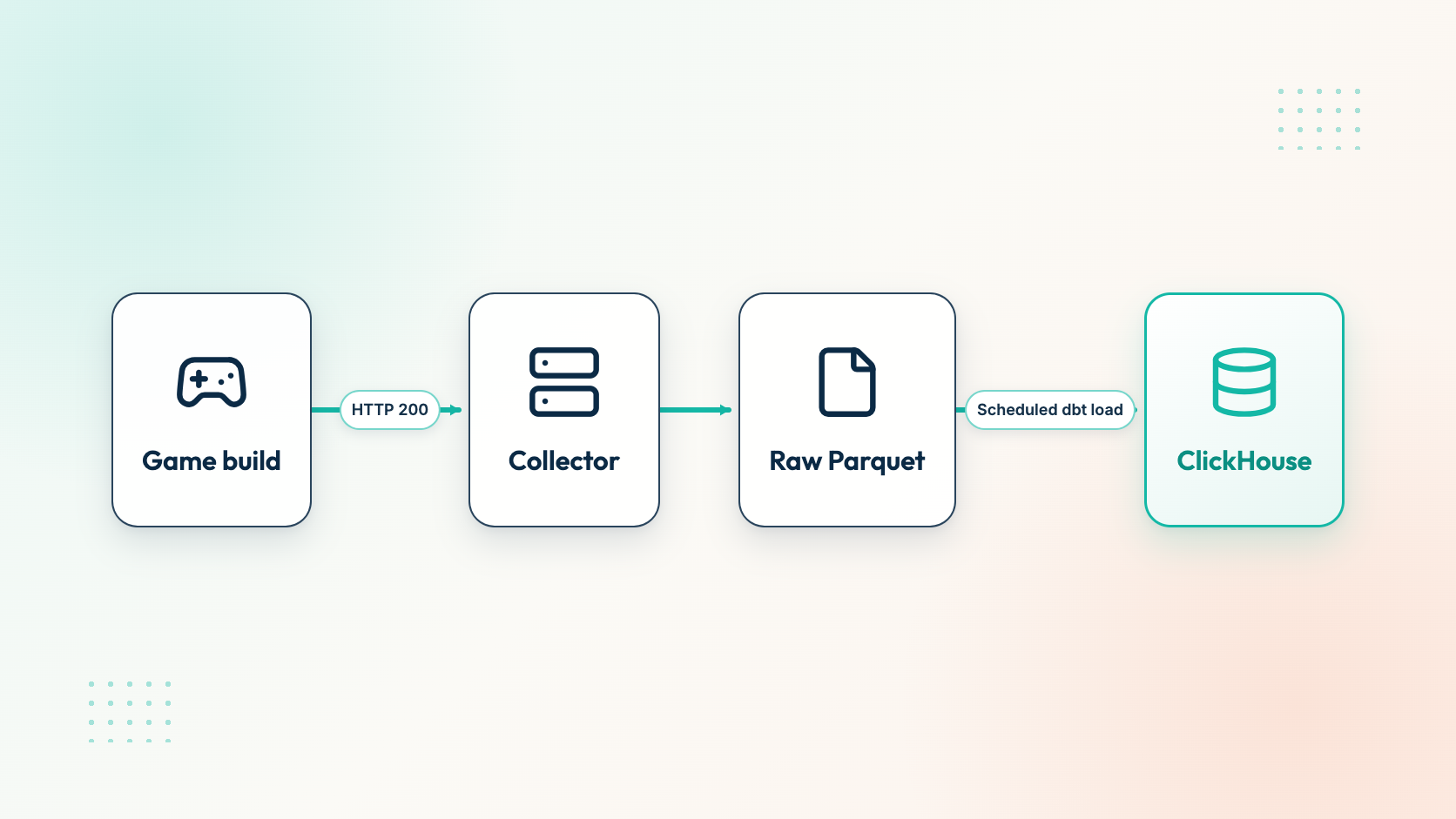
With an hourly schedule, an accepted batch becomes queryable after the next load.
The plugin sends no live events unless you explicitly allow it. Its own check runs against a mocked collector, which works like a unit test. A passing mock check does not prove the flow works in a real build, so send a test build's events to your collector before you ship.
The collector hands accepted events to a message layer, and a separate writer stores them as raw Parquet. A scheduled dbt job then loads them into ClickHouse. The load runs hourly over complete hours, with a daily reconciliation for late files. So an event appears in ClickHouse after its hour has closed and the next load has run. To see every stage, follow one event through the pipeline.
Once the load has run, a first query shows which events arrived and how many:
SELECT event_name, count() AS events
FROM analytics.events
WHERE app_id = 'match3.mobile.game'
  AND event_date = today()
GROUP BY event_name
ORDER BY events DESC
Replace the app_id with your game's. Compare the list with the events you approved in Step 3. If an event is missing, first check that the next scheduled load has run. If it still does not appear, the call probably never fires in the build you tested. For more on this layer, read about querying raw events in ClickHouse. If a step breaks, Rawbbit support can help.
Worked example: the event map behind Rawbbit's demo match-3 game
Rawbbit's demo project shows what a finished event map looks like once data is in. Its data is synthetic: a generated match-3 mobile game, not real players. From June 13 to October 30, 2026, it holds 36 event names, 13,930,976 events and 129,587 synthetic players. The plugin may suggest different names than the demo game uses, for example in_app_purchase after a confirmed purchase instead of iap_started.
Here are the parameters of one level_failed event from the demo, sent from Android on app version 0.5.0:
{
  "level_id": 27,
  "result": "fail",
  "duration_seconds": 289,
  "moves_used": 22,
  "fail_reason": "out_of_moves",
  "continues_offered": true,
  "score": 20725,
  "synthetic_dataset_version": "match3_10m_v5",
  "liveops_season_id": "autumn_candy_clash",
  "experiment_id": "difficulty_curve_v3",
  "experiment_variant": "softer_midgame",
  "incident_id": null,
  "session_index": 7,
  "is_first_session": false,
  "journey_cohort": "payer"
}
Each parameter maps to a design question. level_id and fail_reason show which level stops players and why. moves_used and duration_seconds show whether they nearly made it. continues_offered tells you whether the game tried to keep them. experiment_id and experiment_variant let a designer compare players in the softer_midgame variant with the rest of the experiment. This is the level of detail to ask for in Step 3. One field is only there for the demo: synthetic_dataset_version labels the generated data, and a real game would not send it.
A first useful query on the demo counts players who opened the game each day:
SELECT event_date, uniqExact(user_pseudo_id) AS players
FROM analytics.events
WHERE app_id = 'match3.mobile.game'
  AND event_name = 'app_opened'
  AND event_date BETWEEN '2026-10-01' AND '2026-10-30'
GROUP BY event_date
ORDER BY event_date
It uses only app_opened, the first event in the sessions group. In the demo data, 3,073 synthetic players opened the game on October 1 and 3,373 on October 30. One well-named event is enough for a first useful chart. Once your own events land, build a game-design dashboard in Metabase or ask an AI agent about your game data.
When this flow is not the right fit
The plugin gets events into your code. A designer or an analyst still has to read the numbers and decide what to change. And if your current analytics tool already answers your questions, keep it: this flow pays off when you need raw events you own and can join in SQL.
Next step: get a collector and send your first batch
To run it yourself, self-host Rawbbit free from GitHub, and read how Rawbbit's pipeline works first to see what you will run. If you would rather not run the servers, ask for a quoted setup and we price a managed setup for your studio.
FAQ
Is the Rawbbit Game Events plugin a Unity or Unreal plugin?
No. It is a plugin for Claude, not for an engine. In Claude Code and Cowork it can inspect and change a local checkout of your game; in Claude chat without project files it can only propose an event map. For Unity and browser games it uses the Rawbbit SDKs. Unreal, Godot and other engines get a capability-gap report, and the game can send HTTPS batches to the collector directly.
Do I need a running Rawbbit collector before I use the plugin?
Yes. The tracking calls send events to a collector, so you need its URL and an ingest key scoped to your app. You can self-host Rawbbit for free or ask for a quoted managed setup.
Why don't my events show up in ClickHouse right after I send them?
The collector hands accepted events to a message layer, and a separate writer stores them as raw Parquet. A scheduled dbt job then loads them into ClickHouse, so an event becomes queryable only after the next load runs. With an hourly load over complete hours, that is after the event's hour closes.
Can events be duplicated?
Delivery is at-least-once, and a retried request keeps the same event ID. The collector and the scheduled load drop duplicates on the pair (app_id, event_id). In your own queries, treat (app_id, event_id) as an event's identity.
Does the plugin work with Codex too?
There is a separate Rawbbit Game Events plugin for Codex, version 0.2.2. This guide covers the Claude plugin, version 0.1.6.