
The playtest is over: you suspect level 7 is too hard, and two testers gave up halfway through the tutorial. Then the developer asks: "OK, what exactly should the game track?"
You know the game better than anyone, but you don't know what to write down. The answer is to start from your questions, not from a list of game metrics. This guide shows how to turn those questions into an event map with Claude, review it, and hand it to your developer. It comes with copyable prompts and a worked example from Rawbbit's demo match-3 game.
Why a list of game metrics isn't enough
Lists of game metrics name things like retention, level difficulty and tutorial completion. They don't say what your game has to record for you to see them. Every metric is built from events, and you can't measure later what the game never recorded.
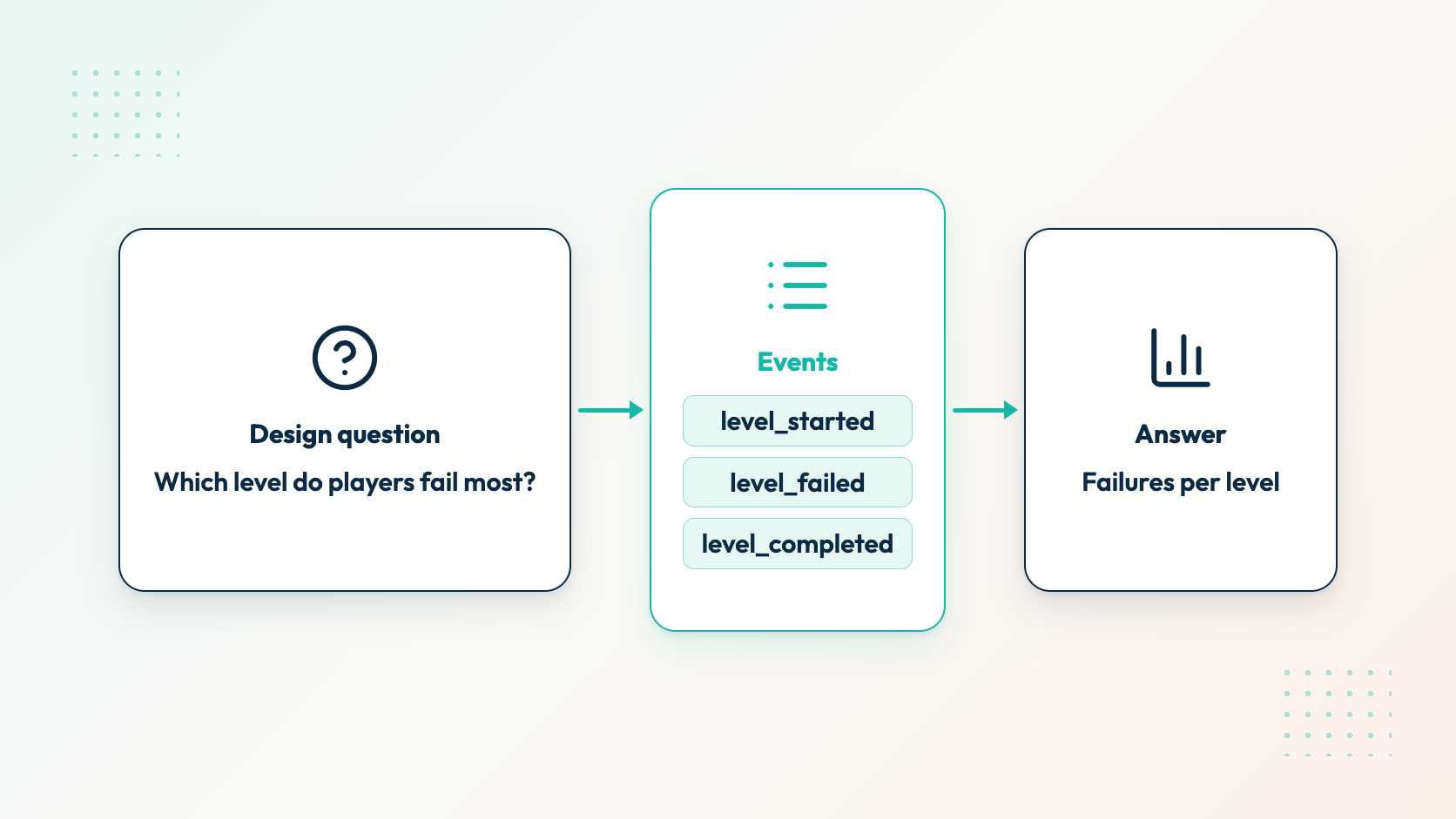
Each event in the map exists because a question needs it.
Three terms are enough to plan this well:
- An event is a note the game writes when something happens, like a diary line: "level 7 failed."
- Parameters are the details on that note: which level, how many moves were used, why it failed.
- The event map is the agreed list of notes and the reason each one exists. Analysts call it an event taxonomy.
A good map is short. Each event earns its place by answering a question your team actually asked. Curious about what each event contains? The event-schema guide walks through a single event. The raw-layer post explains why it pays to keep the raw events: they answer questions you add later.
Step 1: Install the Rawbbit plugin for Claude
The plugin gives Claude Rawbbit's way of planning and adding events. It comes from Rawbbit, open-source game analytics for studios, and Claude lists it as Rawbbit Game Event Tracking. Pick the path that fits how you work.
In the Claude app, no terminal. In Claude chat or Cowork, open Customize > Plugins. Add the GitHub repository mirlan-irokez/rawbbit as a marketplace, then install rawbbit-game-events from it.
In Claude Code. Your developer can run two terminal commands:
claude plugin marketplace add mirlan-irokez/rawbbit
claude plugin install rawbbit-game-events@rawbbit
From a ZIP. Open Rawbbit's GitHub releases page and pick the newest claude-plugin release. The release marked Latest may be the Codex plugin, so check the name. Download the ZIP named like rawbbit-game-events-claude-0.1.6.zip, not the .sha256 file next to it. Then in the Claude app open Customize > Plugins > Add > Upload plugin.
Installing the plugin doesn't start collecting anything. It is not something you add to Unity or to your game. It helps Claude plan your events and, later, helps your developer add them. No event reaches Rawbbit until your developer adds the approved events and a real build sends them to your Collector (Step 5).
Step 2: Write down the questions you want your game to answer
Pick two or three questions you would act on this month. For the demo match-3 game, they are:
- Which level makes players fail most?
- Where do new players drop out of the tutorial?
Why start here? A question tells you which moments matter and which details you need. Without one, a team tends to track every button, and nobody reads half of it. With one, every event has a job, and the map stays small enough to review in a single meeting.
Use this first prompt in Claude to sharpen loose questions into ones the data can answer:
I'm the designer of a match-3 mobile game. Here are my design questions:
1. Which level makes players fail most?
2. Where do new players drop out of the tutorial?
Rewrite each one as a measurable question. For each, say which moments
the game would need to record. Don't propose any code.
A useful answer turns each question into a sharper one, such as "for each level, how many attempts end in a fail?" Each one should come with a short note on the moments the game must record. If the reply drifts into code or tools, ask again.
Step 3: Ask Claude for an event map
Next, ask for the map itself, with the plugin installed. Proposing a map changes no game code, so a designer can run this step alone. In Claude chat without project files, the plugin can only propose a map, and it says it inspected and changed no files. In Claude Code or Cowork, it also saves the map as a document in the project.
Start the prompt with one line about your game. The plugin proposes only events that the mechanics you describe back up, so this line keeps it from guessing.
Our match-3 game is made in Unity. Each level has a move limit and a goal;
the tutorial has 4 steps.
Using the Rawbbit Game Event Tracking plugin, propose an event map for these
measurable questions. Do not change any code. For each event, give the
name, when it fires, the details it carries, and which question it answers.
Check that every event in the reply has the four parts you asked for: name, moment, details and question. Expect more than that. The plugin also gives each detail's type, and it asks about your engine, platforms, consent and player IDs. Here is a short map for the two match-3 questions:
| Event | When it fires | Details | Question |
|---|---|---|---|
| level_started | The level loads and the first move is possible | level_id | Hard levels |
| level_completed | The player meets the level goal | level_id, moves_used | Hard levels |
| level_failed | The level ends without meeting the goal | level_id, fail_reason, moves_used | Hard levels |
| level_retried | The player starts the same level again after a fail | level_id, retry_number | Hard levels |
| tutorial_started | The first tutorial screen shows | none | Tutorial drop-off |
| tutorial_step_completed | The player finishes one tutorial step | step_number, step_name | Tutorial drop-off |
| tutorial_abandoned | The player skips or closes the tutorial before the last step | last_step_number, reason | Tutorial drop-off |
| tutorial_completed | The player finishes the last step | none | Tutorial drop-off |
Eight events cover both questions. That is the point: a small map you can check line by line. Once you approve it, this table is what you paste into the handoff in Step 5.
Step 4: Review the map before anyone writes code
Changing a map on paper is cheap. Changing it after release means old data and new data no longer match. So read it with four checks:
- Does each event answer one of your questions? If not, cut it or write down the question it serves.
- Are the names consistent? The example map uses one pattern: object, then action, in lowercase with underscores (level_failed, tutorial_completed). The plugin follows the same rule: lowercase names that describe something that has already happened. Mixed styles make queries harder to write and easier to get wrong.
- Is the moment it fires clear? A player who quits mid-level is not the same as one who runs out of moves. If both count as level_failed, a long level can look hard just because players quit it midway.
- Does every level event carry the level identifier? Without level_id, you can count fails but not say where they happen.
Then let Claude argue with the map. This prompt finds gaps you might miss:
Challenge this event map. Which of my questions can't it answer?
Which events or details are redundant? Where is the moment an event
fires ambiguous? Suggest the smallest change for each problem.
Read the reply for gaps and duplicates, and ask for a concrete fix wherever one is missing. You decide which fixes to accept.
If your game already sends events to another analytics tool
Many games already track something. Don't throw that away before you compare. Ask your developer to run this prompt in Claude Code or Cowork, inside the game project:
Review the analytics events this game already sends to our current tool.
Compare them side by side with the event map below. For each event,
recommend whether to leave it unchanged, keep the current tool and add
Rawbbit, or replace the current tool with Rawbbit, and say why.
Don't change any code yet.
Go through the list with your developer and decide per event. Our advice is to keep both at first. Your current tool keeps working while you compare its numbers with the new events, and you can drop one side later. The plugin can set up an event so the game sends it to both tools.
Step 5: Hand the approved map to your developer
Once you approve the map, it becomes the contract. Your developer opens the game project in Claude Code or Cowork and runs:
Add only the events from the approved event map I paste below.
Don't add any other events. Keep the ingest key out of the code and
out of this chat. Then check the new events against a mock Collector
and show me what each one sends. Don't send events to a live Collector.
Before it touches code, the plugin checks the project and confirms the engine. It asks for the Collector address, the app_id (your game's ID in Rawbbit) and where the game keeps the ingest key, never the key itself. It asks who decides consent and player IDs, writes the full map into the project and asks for approval. Only then does it add the approved events.
It adds them through a Rawbbit SDK, a small code library your developer adds to the game. Then it checks them against a mock Collector, a stand-in server for testing. Read what each event sends before anyone points the game at a real server.
Two new pieces come in at this step. The Collector is the server that receives your game's events. The ingest key is an access key tied to one game. It ends up inside the game build, so it is not a true secret. It still stays out of the code and out of chats, and Claude asks only where it is stored. Whoever runs your servers sets up both.
Agree with your developer when the game asks players for consent. The SDK treats consent as unknown every time the game starts and sends nothing until the game confirms it.
A passing mock check shows the code sends what the map says. It does not prove that the real game delivers events. Test a real build against a real Collector before you trust any numbers. If you want the full path after that, read what happens after the game sends an event.
Worked example: where players struggle in a demo match-3 game
Here is what the demo project's data says for both questions. The data comes from the Rawbbit demo project, a synthetic match-3 dataset, not real players. The queries ran on November 2, 2026. The demo data keeps growing, so a later run returns different counts.
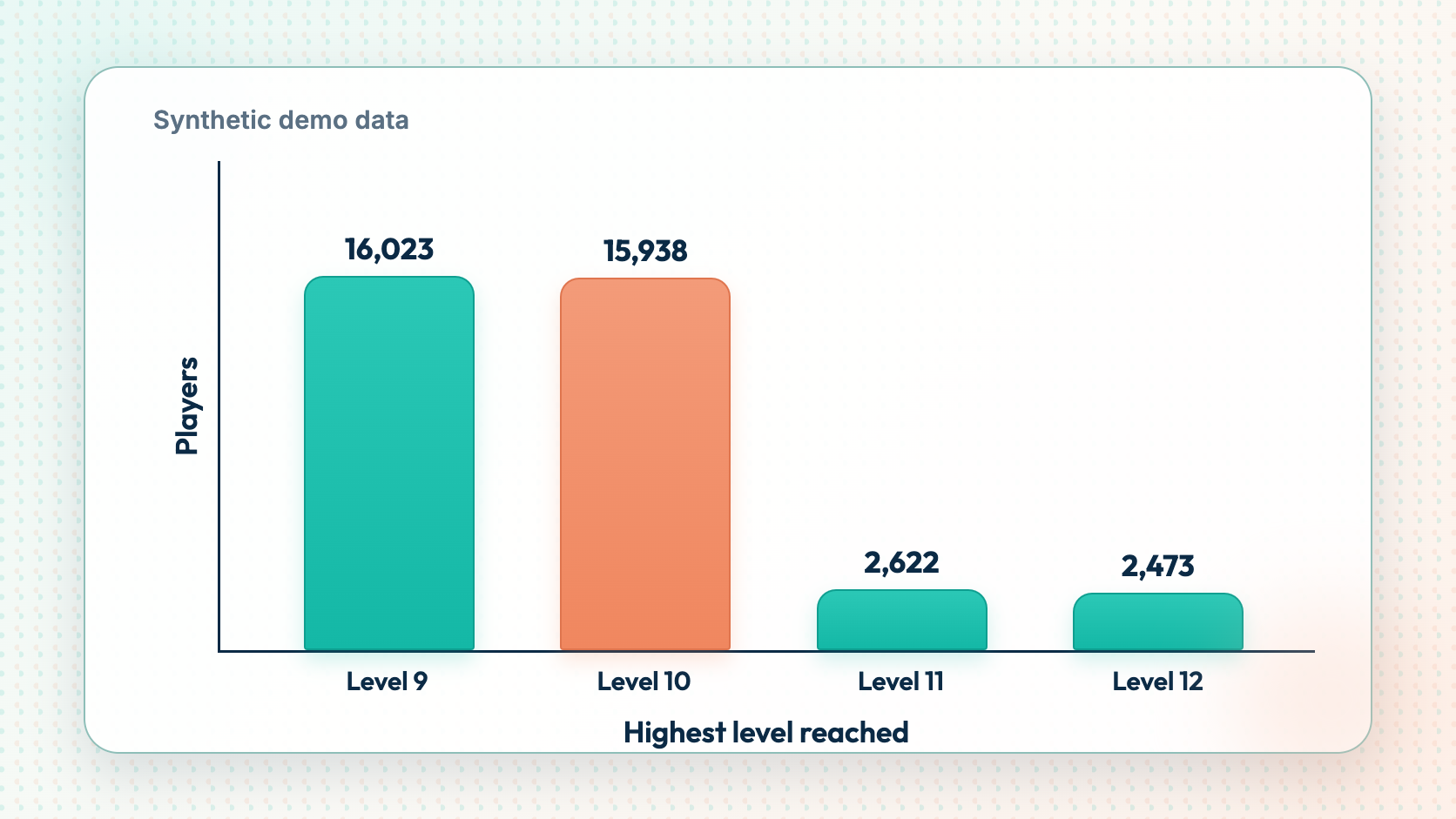
Players counted by the highest level they reached. Rawbbit demo project, synthetic match-3 data, queried November 2, 2026.
Tutorial drop-off. In the demo data, 18,724 players started the tutorial and 18,724 completed at least one step. 13,122 players have a tutorial_abandoned event, and 5,642 completed the tutorial. These two groups overlap, so they don't add up to the players who started. Every starter got past at least one step, which means the drop happens inside the tutorial, not before it. The next thing to look at is which step players see last. That is why tutorial_abandoned carries last_step_number in the map above.
Hard levels. The demo game also stores each player's highest level reached. That shows where progress stops, not how often players fail. Each of levels 1 to 10 was the last stop for 13,584 to 16,023 players, with 15,938 at level 10, while only 2,622 stopped at level 11 and 2,473 at level 12. Most players' progress ends by level 10, so level 10 is where a designer looks first. A playtest hunch like "level 7" is a good start, and the data can point somewhere else.
Whether level 10 is actually hard is a question for the fail events. Count level_failed by level_id and you get fails per level. In the demo, a sample level_failed event carries level_id, moves_used, duration_seconds and a fail_reason such as out_of_moves. A designer can split fails by reason before deciding whether to add moves or change the board.
These answers came from short SQL queries, not from a packaged dashboard. Rawbbit's analytics MCP has tools for daily active users and funnels, plus read-only SQL. It has no ready-made level or tutorial metrics, so an analyst writes the query, or you ask an AI agent through the MCP. MCP is the connection that lets the agent query your Rawbbit data. It is a separate server from the plugin: whoever runs your servers connects Claude to it with an address and an access token. Once real data arrives, a prompt like this one is a good start, and it uses only the events from your map:
Using the Rawbbit analytics MCP, count level_started and level_failed
events per level_id and show which level has the most fails per start.
Then split the fails for that level by fail_reason. Show the SQL you used.
Expect a short table of starts, fails and fails per start for each level, then a split by fail_reason, plus the SQL. Asking for the SQL lets an analyst check the numbers before anyone acts on them. For more on this, see asking an AI agent about your game data. If your team uses Codex, here is how to connect Rawbbit MCP to Codex. When a question comes up every week, build a game-design dashboard in Metabase instead.
What an event map won't tell you
Events show what happened, not why. The demo data says many players never get past level 10. It doesn't say whether the board is unfair, the goal unclear or the session simply too long. A designer still has to read the numbers next to playtests and player feedback.
Resist the urge to track everything. Every extra event costs review time now and maintenance time with each update, and unused events hide the useful ones.
Engine support matters too. Rawbbit has a JavaScript SDK for browser games and a Unity SDK. The Unity SDK hasn't been compiled in the Unity Editor or run on Android or iOS devices yet, so check it in your own build first. There is no native Unreal or Godot SDK, but any engine that can make HTTPS requests can send batches of events directly. For those engines, the plugin can still propose an event map, but it writes a short report of what is missing instead of adding an SDK.
Next step: get the events somewhere you can query
An approved event map is only useful once the events land somewhere you can ask questions. You can self-host Rawbbit for free from the GitHub repository, or ask for a quote on a managed setup we price for your studio. To see the whole path from game to answer, read how Rawbbit turns events into answers. Stuck on setup? Rawbbit support can help.
FAQ
What is an event taxonomy in game analytics?
It is the agreed list of events your game records, with the details each one carries, when it fires and the question it answers. Think of it as the game's event map: a short, reviewed list instead of tracking everything.
How many events should a game track at first?
Only as many as your first two or three design questions need. In this guide's match-3 example, eight events cover tutorial drop-off and hard levels. Add more when a new question needs them.
Does the Rawbbit plugin for Claude change my game's code?
Not when it proposes an event map: that step changes no game code. After you approve the map, your developer can ask it in Claude Code or Cowork to add only the approved events and check them against a mock Collector.
Can I plan events in Claude chat without giving it my project?
Yes. In Claude chat without project files, the plugin can only propose an event map, which is exactly the planning step. Adding the approved events happens later, in your developer's project in Claude Code or Cowork.
Do I need a data engineer to get answers from these events?
Not necessarily. Rawbbit's analytics MCP has daily-active-user and funnel tools plus read-only SQL, but no ready-made level or tutorial metrics. An analyst can write those queries in SQL, or you can ask an AI agent over the MCP and have the query checked.