
A designer asks why players quit around level 12. You open the code. The game sends one event, app_opened. Nobody on the team owns game event tracking.
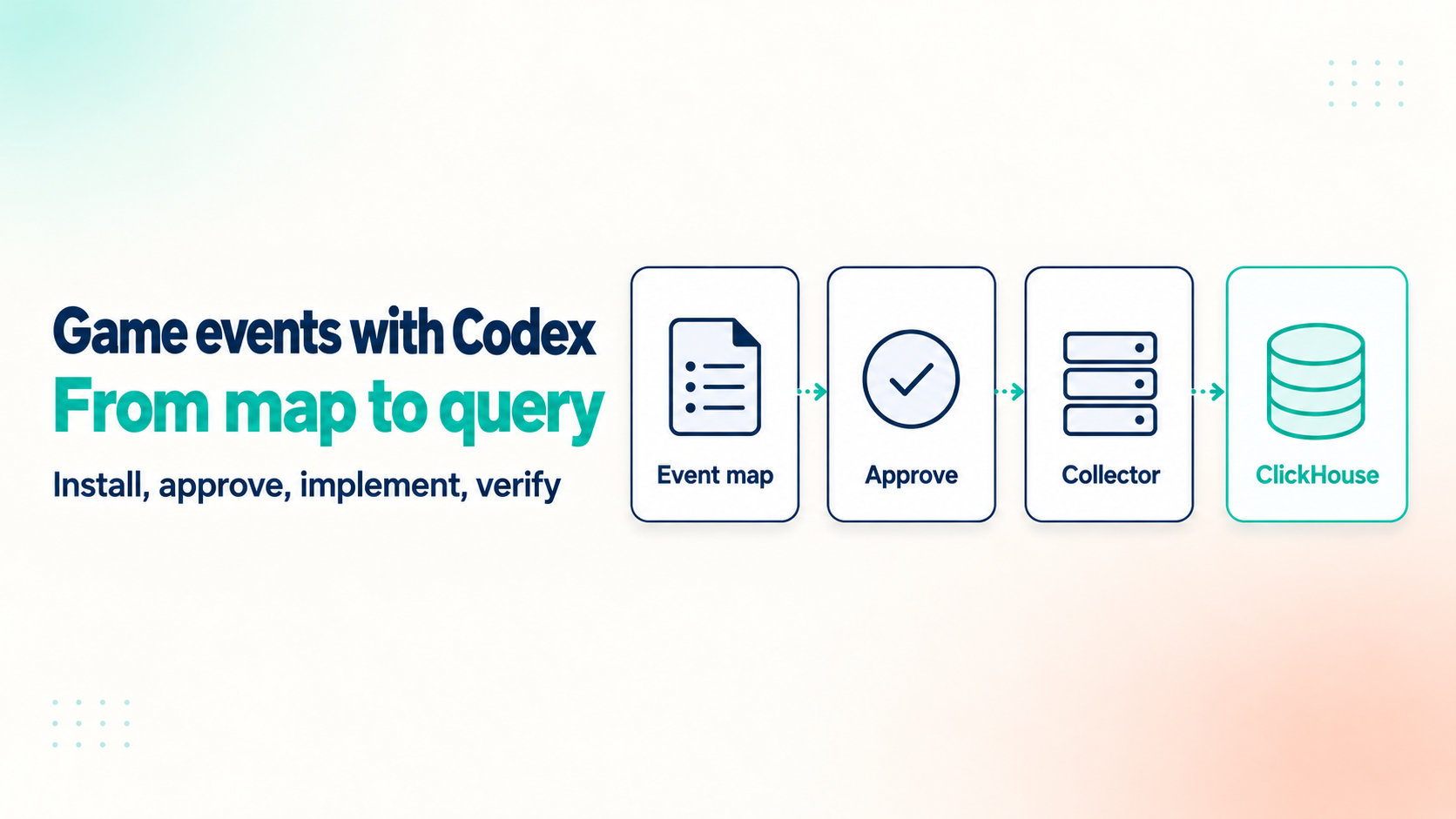
Codex can read the whole project, but "add analytics" is a bad prompt. This guide walks through the full flow with the Rawbbit Game Events plugin: install it, get an event map, approve it, add the events, check them, and query them in ClickHouse.
What the Rawbbit Game Events plugin does, and what it is not
The rawbbit-game-events plugin is a plugin for Codex, the coding agent. It is not a Unity, Unreal or Godot engine plugin. It gives Codex a fixed way to add analytics events for a Rawbbit pipeline to a game, so the agent follows steps instead of guessing. Codex writes the code. You own the questions and the review.
The flow runs in a fixed order. Codex inspects your game and proposes an event map: a document that lists which events to send, where in the code they fire, and what data they carry. You approve the map. Codex then adds the approved events and verifies them against a mocked Collector. An event map is a plan: no SDK is installed and no event is sent yet.
Two SDK snapshots come bundled with the plugin, one for browser JavaScript and one for Unity C#. Unreal, Godot and other engines without a bundled SDK get a capability-gap report instead of code, so you see what is missing before work starts. There is no native Unreal or Godot SDK. A game on such an engine can still send HTTPS batches to the Collector directly: POST /v1/events:batch, with the key in the X-API-Key header. The game then has to build what the SDKs do itself: consent, a durable queue with retries, and stable event IDs.
For web games, the SDK needs a secure, top-level page with IndexedDB, Web Locks and Fetch. A game embedded in a third-party iframe, as on many web game portals, falls outside that. So does a Unity WebGL build. For those targets, Codex writes the same capability-gap report instead of code.
Step 1: Install the plugin in Codex
The plugin runs in the ChatGPT desktop app, where Codex lives. It needs a local executor, so it works on desktop only. The two simplest ways to install it are these.
The shortest is the terminal. Run these two commands, then restart the ChatGPT desktop app:
codex plugin marketplace add mirlan-irokez/rawbbit
codex plugin add rawbbit-game-events@rawbbit
This installs the version on the main branch of the Rawbbit repository.
The other way is a release archive. Download rawbbit-game-events-<version>.zip from the latest codex-plugin release on the Rawbbit GitHub releases page. In the ChatGPT desktop app, open Plugins, choose Add, then Upload plugin archive, and pick the ZIP.
Either way, open your game's folder in Codex afterwards. The plugin works on the project files on your machine, so Codex needs the game open to inspect it.
The plugin also comes with the public, read-only SDK Catalog MCP server at https://sdk-catalog.rawbbit.one/mcp, which checks whether your target fits an SDK. It does not query your analytics or accept events.
Step 2: Write down one gameplay question first
With the plugin installed, pick one question you want answered. For the designer above, it is: where do players fail or quit a level?
A question keeps the event map lean. Every event you send has to be named, tested and maintained for as long as the game ships. "Track everything" gives you dozens of events with vague triggers, and nobody remembers why half of them exist. One question gives you three or four events you can check by hand.
Step 3: Let Codex inspect the game and propose an event map
Start the proposal phase with a prompt that names the plugin, describes your stack and forbids code changes. Here is an example for a TypeScript browser game:
Use rawbbit-game-events. Inspect this TypeScript/Vite/Babylon.js browser game
and prepare docs/analytics/rawbbit-event-map.md proposing events. Do not
integrate the SDK or send real events yet. Explicitly identify missing settings.
Swap in your own stack and add your gameplay question. Codex changes no game code in this phase. It reads the project and writes a proposal.
By default, the map goes to docs/analytics/rawbbit-event-map.md. If the game already has an analytics document, Codex updates that one instead. The map lists the proposed events and where they hook into the code. It also flags high-frequency events to leave for later, and the consent, identity and configuration decisions that are still missing. Those open decisions are the most useful part, because they are the questions a developer would otherwise answer by accident.
For the level question, a lean map can be as small as this. The event names come from the Rawbbit demo project, and the triggers and parameters are a hand-written example. Your file will look different.
| Event | Fires when | Parameters |
|---|---|---|
| level_started | The player enters a level | level_id |
| level_completed | The win screen shows | level_id, duration_seconds, moves_used, score |
| level_failed | The level ends without a win | level_id, fail_reason, moves_used, duration_seconds |
| level_retried | The player taps retry after a fail | level_id |
Step 4: Review the event map before you approve it
This step is your job, not the agent's. The plugin structures the work, but it does not guarantee the event design is right. A wrong trigger here becomes wrong data in every chart later.
Read each event and ask a few plain questions. Is the name in snake_case, like level_failed? One convention keeps names predictable when you write SQL months later. Does the trigger fire once per attempt, not once per frame or per tap? Do the parameters answer your question? A fail_reason value such as out_of_moves lets you group failures; free text does not.
Then settle identity and consent. Decide which player ID the game sends, and when tracking may start. In a browser game, that often means after a consent choice.
If the game already sends events to another tool, decide per event. The plugin offers four options: leave the event unchanged, keep the other tool and add Rawbbit (dual-write), replace the other tool with Rawbbit, or Rawbbit-only maintenance. Writing that down now saves an argument about which number is "right" later. For the fields every event carries, see the Rawbbit event schema.
Step 5: Implement the approved events
Tell Codex which events you approve. It then adds the calls with the bundled SDK snapshot. Integration may copy one bundled SDK into the game and run the game's own build and test commands. A Unity project also needs the com.unity.nuget.newtonsoft-json package. Review the diff the way you review any pull request: right file, right moment, right parameters.
The browser SDK queues events in IndexedDB, the browser's local database, and retries failed sends. It sends nothing until the game confirms the player's permission, and consent starts unknown on every launch. Your game owns the consent screen and the decision. The SDK needs the secure, top-level page described above, so check your target browsers and hosting before you rely on it.
The Unity C# SDK is an initial source implementation with a persistent queue, consent and retries. It has not been compiled in the Unity Editor or run on Android or iOS devices yet. Build and test it in your own project before you ship, and treat early results with care.
Step 6: Verify against the mocked Collector
After implementing, Codex checks the new calls against a mocked Collector, a local stand-in for the real endpoint, before any real data moves. The plugin sends no live events unless you explicitly allow it.
A passing check does not prove live delivery. Your endpoint, ingest key, CORS settings and network are not part of the test.
Step 7: Point the game at your real Collector
This is the first step that needs a Rawbbit Collector, the HTTPS endpoint that receives your events. You can self-host it for free or ask for a quote on a managed setup we price for your studio. You also need an app_id and an ingest key scoped to that one app.
Configure four values: the Collector endpoint, your app_id, the environment and the ingest key. Start with a test environment, so your first events do not mix with production data.
The plugin never asks for the key's value. It asks where the game stores the key: a config file, a variable or a deployment setting. Codex puts a placeholder in the code it commits, and you set the real key in the game's own configuration. That keeps the key out of the chat and out of the code Codex commits.
The SDK sends batches to POST /v1/events:batch. By default, each request holds at most 500 events or 1 MiB, and a deployment may set lower limits. The SDKs split batches themselves.
Browser games need two more settings. The Collector must allow your game's origin through CORS, and your page's Content Security Policy must allow requests to the endpoint. The ingest key embedded in the browser is visible to any player who opens the developer tools. Treat it as a public identifier for one app, not a private credential.
Delivery is at-least-once. If a send fails, the SDK retries, and a retry can arrive twice. Retries keep the same event ID. The Collector and the scheduled load drop duplicates on the pair app_id and event_id. If you write a check of your own, treat that pair as an event's identity, not event_id alone.
How your events reach ClickHouse, Metabase and MCP
Once the Collector accepts a batch, the events take a fixed path. The Collector puts them in NATS JetStream, a durable buffer. A writer stores them as raw Parquet files in object storage. dbt Core then loads them into ClickHouse every hour, with a daily reconciliation for files that arrive late. From there you query them with SQL, build Metabase dashboards, or ask questions through MCP.
Each accepted batch is buffered, stored as Parquet, then loaded into ClickHouse on a schedule.
Loading is asynchronous. An accepted request means the Collector has the events, not that ClickHouse can return them yet. If a query comes back empty right after a test, wait for the next hourly load before you debug the game.
The Parquet files stay as your source of truth, and ClickHouse is built from them. For the full walkthrough, read how one event moves through Rawbbit. For why the query layer is ClickHouse, see ClickHouse for raw game events.
Check that your events landed
A daily count per event is the quickest check. Set your own app_id, environment, event name and start date. The app_id and environment filters keep test events apart from production:
SELECT event_date, count() AS events, uniqExact(user_pseudo_id) AS players
FROM analytics.events
WHERE app_id = 'my.game.app'
  AND environment = 'test'
  AND event_name = 'level_completed'
  AND event_date >= toDate('2026-10-24')
GROUP BY event_date
ORDER BY event_date
LIMIT 10
In the Rawbbit demo project, a synthetic match-3 dataset, the same daily count returns one row per day from October 24 to October 30, 2026. The first day has 3,998 level_completed events and the last has 3,807. Rows for every day tell you events are flowing. A missing day is where you start looking.
You can ask the same question in plain words from Codex once you connect Rawbbit MCP to Codex.
Worked example: a level funnel in a match-3 game
Here is what the level map answers once the data is in. The numbers come from the Rawbbit demo project, a synthetic match-3 dataset. They were generated for the demo, not sent by real players, and not added with the Codex plugin.
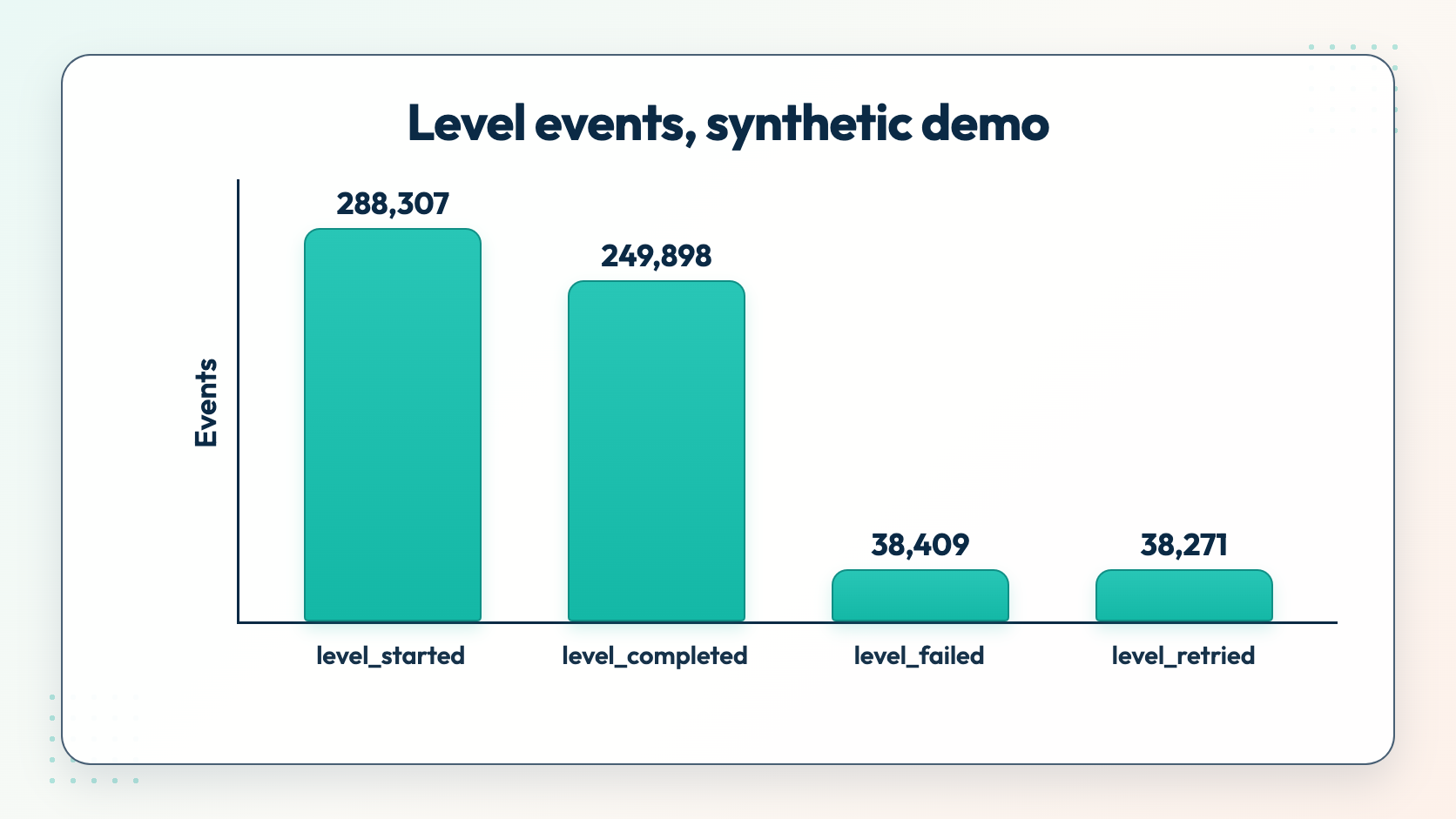
Synthetic demo data from the Rawbbit match-3 demo project, not real players.
| Event | Events | Players |
|---|---|---|
| level_started | 288,307 | 92,980 |
| level_completed | 249,898 | 92,927 |
| level_failed | 38,409 | 25,453 |
| level_retried | 38,271 | 25,353 |
The four events already give a designer a level funnel: starts, wins, fails and retries, by event and by player. The parameters carry the detail. One level_failed row from October 30, 2026 shows level_id 27, fail_reason out_of_moves and moves_used 22.
With fail_reason and level_id on every fail, the designer's question becomes a query: group fails by level, then by reason. That is the point of starting from one question. If your approved map carries level_id and fail_reason, those are exactly the columns that query needs. To turn this into a chart the team checks every week, build a game-design dashboard in Metabase.
Where this workflow stops
The plugin covers browser JavaScript and Unity; other engines send HTTPS batches directly. Games inside a third-party portal iframe and Unity WebGL builds get a capability-gap report, not an SDK integration. The Unity SDK has not been compiled in the Editor or run on Android or iOS devices yet, so test it in your own build first.
Codex will not find every event worth tracking. Metabase starts empty, and you build the charts for your own events. A designer or analyst still has to read the funnel and decide what to change. For the analysis side of agent workflows, see AI agent for game analytics.
Next step: run it on your own pipeline
To try the whole flow on servers you run, self-host Rawbbit for free from GitHub under Apache 2.0, or ask for a quote on a managed setup we price for your studio. The how it works page shows the full pipeline your events enter.
FAQ
Is the Rawbbit Game Events plugin a Unity or Unreal plugin?
No. It is a plugin for the Codex coding agent, not an engine plugin. It bundles browser JavaScript and Unity C# SDK snapshots. There is no native Unreal or Godot SDK; those engines get a capability-gap report and can send HTTPS batches to the Collector directly.
Will Codex change my game code without asking?
No. Codex writes code only for events you approve. First it writes an event map and changes no game code. You then review the diff like any pull request.
Can I keep my current analytics tool while adding Rawbbit events?
Yes. For each existing event the plugin offers four options: leave it unchanged, keep the other tool and add Rawbbit (dual-write), replace the other tool with Rawbbit, or Rawbbit-only maintenance. You choose per event when you review the map.
Why don't my events show up in ClickHouse right away?
Loading is asynchronous. The Collector accepts the batch, the events are written to Parquet, and dbt loads them into ClickHouse every hour, with a daily reconciliation for late files. Wait for the next load before you debug the game.
Is the ingest key in a browser game a secret?
No. A key embedded in a browser game is visible to anyone who opens the developer tools. It is scoped to one app_id, so treat it as a public identifier, not a private credential. The plugin never asks for its value; you set it in the game's own configuration.
What happens if the same event is sent twice?
Delivery is at-least-once, so a retry can arrive twice. Retries keep the same event ID, and the Collector and the scheduled load drop duplicates on the pair app_id and event_id. Any check of your own should treat that pair as the event's identity, not event_id alone.