
Your game has been out for a few weeks. Wishlists turned into installs, but your Discord is quiet, and you can't tell whether people stall on level 3 or never finish the tutorial. You have no analyst, and you've never set up game analytics.
Have your game write a few notes, like "level started", "level failed" and "tutorial left", then ask where the notes stop. This guide shows how to get there yourself: Codex with the Rawbbit plugin proposes those notes and adds the ones you approve. You also get copyable prompts and a worked match-3 example.
Why "where do players quit?" is hard without an analyst
Players don't announce that they're leaving. They just stop opening the game. To see where that happens, your build has to leave a trail, and most indie builds don't keep one.
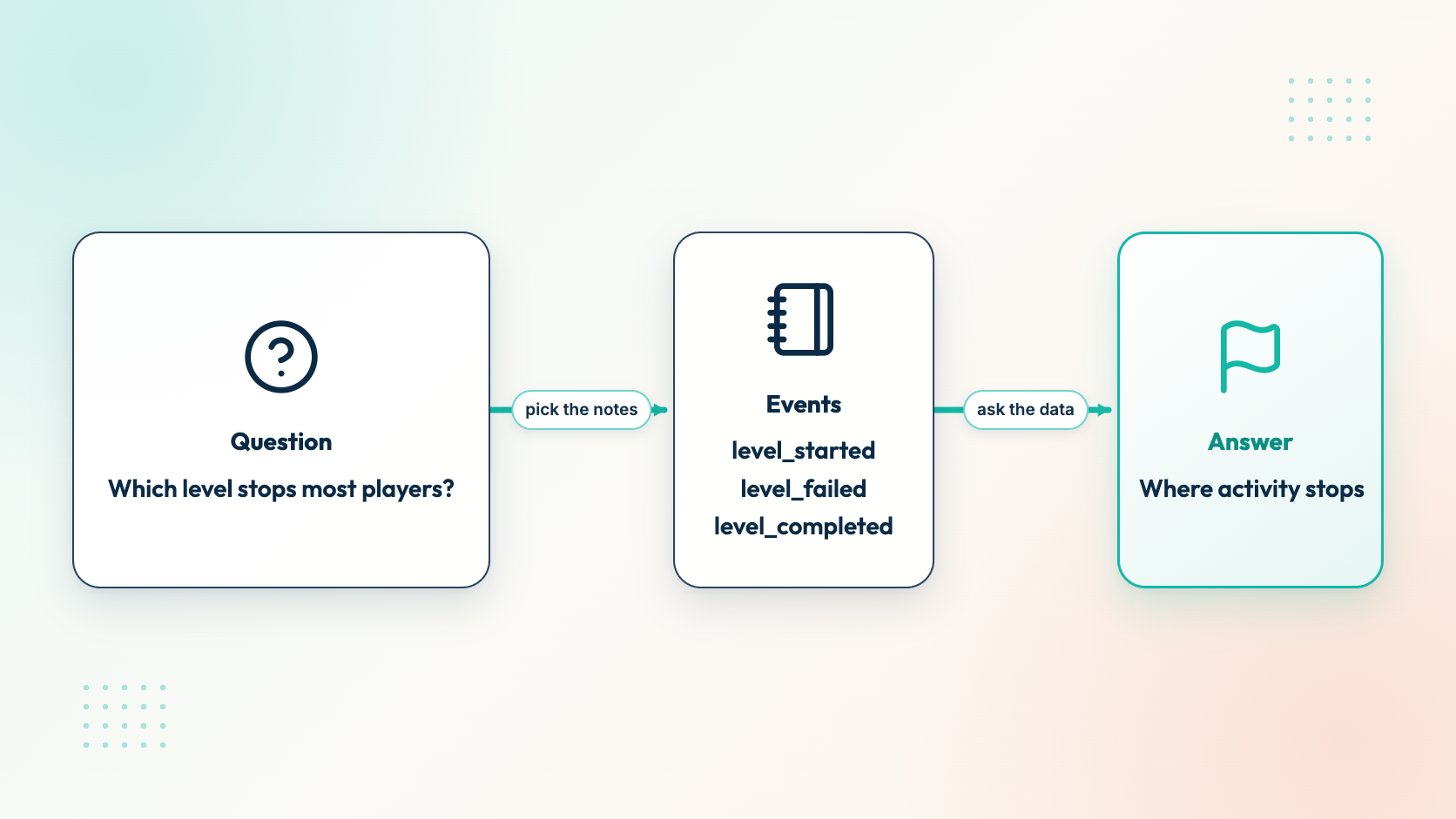
Every event in the map exists to answer one design question.
Think of it as a notebook the game fills in. An event is a note the game writes when something happens: "level 3 started", "level 3 failed". Parameters are the details on that note, like which level it was or how many moves the player used. The event map is the agreed list of notes, with one line on why each one is needed.
Once those notes exist, the question gets simple. Find the last note each player wrote, and look at where most of the notes stop. That shows where activity stops. It doesn't show why people left. Working out the why stays your job as the designer. You know the game better than any chart does.
Step 1: Install the Rawbbit plugin for Codex
The plugin, listed in the app as Rawbbit Game Event Tracking, works inside Codex, the coding agent, not inside your game engine. It reads your project, proposes notes and adds the ones you approve. This guide uses release 0.2.2. The plugin runs in the ChatGPT desktop app, so you'll use Codex there with your game's folder open.
The shortest install is two terminal commands:
codex plugin marketplace add mirlan-irokez/rawbbit
codex plugin add rawbbit-game-events@rawbbit
Then restart the ChatGPT desktop app so it picks up the plugin.
You can also install from the release archive. Download rawbbit-game-events-<version>.zip from Rawbbit's GitHub releases page. Then add it in the ChatGPT desktop app under Plugins > Add > Upload plugin archive.
An SDK is the small library your game calls to write its notes. The plugin bundles two: Unity C# and browser JavaScript. The Unity SDK hasn't been compiled in the Unity Editor or run on Android or iOS yet, so test it in your own build. Neither SDK covers Unity WebGL builds. Neither covers browser games embedded in another site's page through an iframe, as on many game portals.
For any other engine, the plugin writes a short report of what's missing instead of adding an SDK. There is no native Unreal or Godot SDK yet. Sending events from those engines means writing your own small sender that handles consent, a queue and retries.
Step 2: Write down the questions you want answered
Start with what you want to know, not with the tool. Write two or three questions in plain words. For the match-3 demo game used later in this guide, they are:
- Do players finish the tutorial?
- Which level stops most players?
- When players fail a level, do they retry or leave?
Every note in your map should answer one of these. A note that answers nothing still adds code you maintain and rows you scroll past. Clear questions also give Codex a reason to pick one event over another, so its proposal stays short.
Step 3: Ask Codex for an event map before any code changes
Use this prompt first, with your game's folder open in Codex and nothing changed yet:
Use the Rawbbit Game Event Tracking plugin. Inspect this game project and propose an event map for these questions:
1. Do players finish the tutorial?
2. Which level stops most players?
3. When players fail a level, do they retry or leave?
For each event, give its name, its parameters and the question it answers.
Do not change any code yet. Wait for my approval.
Codex may first ask you to confirm the engine and platforms, where the game's settings live and who decides consent. Then it comes back with a proposed list: event names, their parameters and the reason for each. It saves the map as a file in the project, by default docs/analytics/rawbbit-event-map.md, but changes no game code and waits for your approval. Read it like a design doc, not a pull request.
Step 4: Review the map and approve only what answers your questions
This is where your judgment matters most. Cut anything that doesn't serve a question, even if it looks handy. A generic button_clicked or settings_opened note is easy to add and hard to read later. Keep names lowercase with underscores, like level_failed, so every query spells them the same way.
Keep the events that answer a question; skip the ones that only look handy.
When the list looks right, approve it by name. Use the event names from your own map; these come from the example.
Approve these events from the map: tutorial_started, tutorial_abandoned, tutorial_completed, level_started, level_failed, level_retried, level_completed.
Each level event must carry the level number.
Mark every other event as not approved.
Show me the final map. Do not write code yet.
The reply should be the final map, with the other events still listed but marked as proposed or rejected, and no code written. If something is still off, edit the list and send it again.
If your game already uses another analytics tool
Many games already send a few events to a tool like Firebase Analytics or GameAnalytics. You don't have to rip that out. Rawbbit can run alongside it, with your game sending chosen events to both. Ask Codex to lay out the current events before you decide:
This game already sends analytics events to another tool.
List every event it sends today and where in the code each one fires.
For each event, suggest one of four options and say why: leave it unchanged, keep the other tool and add Rawbbit, replace the other tool with Rawbbit, or Rawbbit-only maintenance.
Do not change any code until I choose for each event.
Expect a list of today's events, each with one of the four options suggested. You make the call per event. Keeping the other tool and adding Rawbbit is the safest start, because nothing you rely on today disappears. Replace the other tool for an event only after that event shows up in your Rawbbit data. If Firebase is your current tool, read if you already use Firebase Analytics.
Step 5: Add the approved events and check them against a mock
Now let Codex write code, but only for the approved map. Send this once you're happy with the final list:
Add only the events in the approved map, using the SDK bundled for this engine.
Read the ingest key from the game's config; I'll add the key there in a later step. Do not ask me for the key itself.
Check the events against a mock Collector. Do not send any live events.
Show me the diff and the check results.
You get back a code change (a diff) and the result of a check against a mock Collector, a fake receiver that stands in for the real one. The reply also lists checks it could not run, such as Unity Editor or device tests. Read the diff before you merge it.
A passing mock check shows the code builds the notes correctly. It doesn't prove your real game sends them. That proof comes in Step 7, when real events show up in your data.
Consent stays with your game. Your game decides whether and when to ask players for permission. Both SDKs hold events until the game confirms consent, and consent starts as unknown every time the game launches.
Step 6: Point the game at your Collector
Your notes need somewhere to go. That place is a Rawbbit Collector, the server that receives your game's events over HTTPS. You can self-host Rawbbit for free on your own servers, or ask for a quoted setup that we price for your studio.
The game needs four settings: the Collector's HTTPS address, an app_id that names your game, an environment such as prod or dev, and an ingest key that lets this one game send events. Store the key in the game's config, not in a chat prompt. Players could dig it out of the build, but it only lets this one game send events.
Browser games have one more setting. Add the game's web address to the Collector's allowed origins, or the browser will block the requests.
Then play a few levels yourself. Don't expect those events in a query the second the Collector accepts them. They are stored first and loaded for querying afterward. To see the path, follow one event through Rawbbit.
Step 7: Ask the data where players stop
The plugin can't answer this part. Its optional catalog tools only report SDK versions, compatibility and the Collector's event format, and they never see player data. To query events from Codex, you need Rawbbit's analytics MCP: a small read-only server next to your Rawbbit data that you run yourself or get as part of a quoted setup. Set it up with the guide to connect Rawbbit's analytics to Codex.
With that connection in place, ask for the funnel:
Using the Rawbbit analytics connection, query this game's events.
1. Build an ordered funnel: tutorial_started, tutorial_completed, level_started, level_completed. Count players at each step.
2. Count players by the furthest level they reached.
3. Name the levels where the most players stopped.
Include my test environment as well as prod.
Show the SQL you ran, or the funnel tool's settings (dates, time window, environment).
An ordered funnel counts players who did the steps in order. Rawbbit's funnel tool counts them within a time window, 24 hours by default, over a date range. It looks at the prod environment unless you ask for more, which is why the prompt adds your test environment. The tool returns counts, not SQL, so keep its settings or the SQL to rerun the same question after your next update.
To check whether failures push players out, try this follow-up:
For each level, compare two groups of players:
players who failed the level and then retried it,
and players whose last level event (ignoring session and app events) was a failure on that level.
Show the counts per level and the SQL you ran.
Expect two counts per level. A level where the "last level event was a failure" group is large is your first suspect.
Prefer charts to chat? Build a game-design dashboard in Metabase over the same events. For the bigger picture, read what an AI agent can and can't do with game data.
Worked example: where players quit in the demo match-3 game
Rawbbit's demo project is a synthetic match-3 mobile game: generated data, not real players. It's a quick way to see the "where do they stop?" question get an answer. The numbers below come from the demo project on November 2, 2026.
This example uses three things from the demo:
- the furthest level each player reached, a value the demo stores per player
- the last event each player sent
- one
level_failednote
That note came from Android, app version 0.4.1, and carries details like these:
{
  "level_id": 33,
  "result": "fail",
  "duration_seconds": 148,
  "moves_used": 25,
  "fail_reason": "out_of_moves",
  "continues_offered": true,
  "score": 11709
}
For the full note format, see what a Rawbbit event contains.
Where players stop. Counting players by their furthest level shows a clear break:
| Furthest level reached (selected levels) | Players |
|---|---|
| 1 | 13,584 |
| 5 | 14,846 |
| 9 | 16,023 |
| 10 | 15,938 |
| 11 | 2,622 |
| 12 | 2,473 |
| 20 | 971 |
Each player counts once, at the furthest level they reached, so every row is the number of players who got that far and no further. Between 13,584 and 16,023 players stop at each of the first ten levels. Then the count falls from 15,938 at level 10 to 2,622 at level 11, so far fewer players get past level 10.
Each player's last note adds one more lesson. For 159,222 players it was session_ended, and for 16,684 it was app_opened. Those notes only say a session started or ended, not where in the game the player stopped. That's why tutorial and level notes earn their place in the map.
The answer: in this demo game, most players stop somewhere in the first ten levels, a similar number at each one, and only a much smaller group plays past level 10.
In your own game, the tutorial and retry questions follow the same pattern: count players at tutorial_started, tutorial_abandoned and tutorial_completed, and run the Step 7 follow-up prompt for failures and retries.
A designer's next move is a hypothesis to test, not a conclusion. Players leave steadily through the first ten levels. Compare the level_failed notes and their fail_reason on the early levels with those on levels past 10 before changing anything. If your own tutorial counts show most starters abandoning, try a shorter tutorial on part of your new installs and compare completion.
What this won't tell you
The data shows where activity stops, not why. A player who leaves at level 10 might be bored, stuck or out of time. Playtests, reviews and your own design sense separate those.
The answers are only as good as the notes you chose. If the map has no tutorial events, no query can tell you about the tutorial.
Rawbbit doesn't ship packaged game dashboards. You get answers from a query, or you build or adapt your own Metabase view.
Next step: run it on your own game
Write your two or three questions today, then run the first prompt on your game. It changes no code, and the map alone shows what your game should be writing down.
When you're ready to collect data, self-host Rawbbit from GitHub. It's open-source game analytics under Apache-2.0, with no per-event fees; you run the servers. Self-hosting keeps the raw events in your own storage, and here's why you keep the raw events. Rather not run servers? Ask for a quote on a managed setup. See how Rawbbit fits together for the full picture. If a step fails, ask Rawbbit support.
FAQ
Do I need an analyst to find where players quit my game?
No. You need a few well-chosen events, like tutorial and level started, failed and completed, and one clear question. The data then shows where activity stops. Deciding why players left is still a design call.
Can the Rawbbit plugin for Codex see my players' data?
No. The plugin's optional catalog tools only report SDK versions, compatibility and the Collector's event format, and they never see player data. To query your players' events from Codex, you connect Rawbbit's analytics MCP separately, or you use Metabase or SQL.
Which game engines does the Rawbbit Codex plugin work with?
It bundles a Unity C# SDK and a browser JavaScript SDK; test the Unity SDK in your own build first. For other engines it reports what's missing. There is no native Unreal or Godot SDK yet. Any engine that can make HTTPS requests can send batches of events directly.
Can I keep my current analytics tool while adding Rawbbit?
Yes. Rawbbit can run alongside it, with your game sending chosen events to both. Ask Codex to list your current events first, then decide per event before any code changes.
Does a passing mock check mean my game is sending events?
No. A mock check shows the code builds the events correctly. Only real events arriving in your data prove the game sends them.
Is Rawbbit free for an indie developer?
Self-hosting is free: Rawbbit is open source under Apache-2.0, with no per-event fees, and you run the servers. A managed setup is priced by quote.