
It's the Monday after your MOBA ships its second season: a new hero, a battle pass and a weekend event. Discord is loud, but the producer still can't say whether the season worked, who played the new hero, or why the queue felt thin on Sunday. The meeting runs on opinions.
This guide gives you the four questions a live team answers every week. It also lists the events your game must send before launch so those questions have answers. Finally, it shows how to set this up without a data team.
What running a live service game means for the studio
From the studio's side, a live service game is one you keep changing after launch. You ship seasons, events and patches, and the game earns money over time instead of in one sale. Shooters, MOBAs and MMOs are the usual examples. Any genre that keeps adding content works this way, too.
That model turns every season, event and patch into a bet. The hard part is timing. Your team plans the next season before the results of the last one are in. Without weekly numbers, nobody can tell which bets paid off, so the next plan copies whatever felt right in the last meeting.
The fix is a weekly routine built on four questions. Are new players staying as well as last month's? Did players actually play the new content? Is the economy still balanced, and who is paying? Who left after the last update? You can only answer them after launch if the game already sends session, progression, content, economy and purchase events. Each event also needs the build version and the season or event it belongs to.
The four questions to answer every week
Treat the weekly review as a decision meeting, not a status report. Each question should end in one of two things: a change to make, or a specific thing to investigate before next week. When a number moves and the team can't explain it, write the question down and give it an owner.
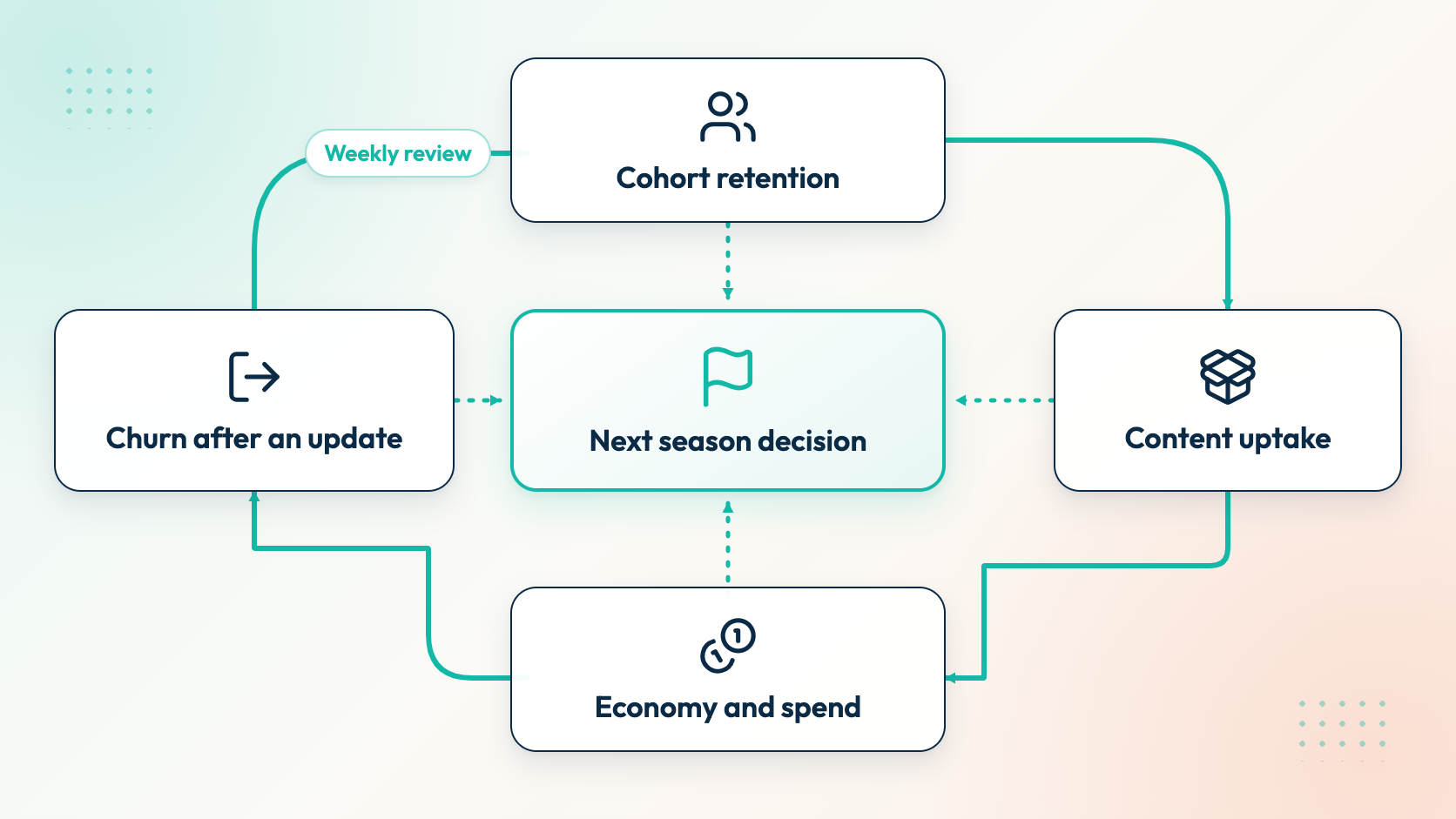
The four weekly questions each feed the decision about the next season.
The numbers come from whoever is closest to the data. At a studio with an analyst, that person prepares them. Without one, the producer can pull them from a dashboard or ask an AI agent connected to the event data. The producer or game lead makes the call. Keep the order the same every week, so the team compares like with like.
Are new players staying as well as last month's?
Start with retention by install cohort: players grouped by the week they installed. Compare this week's cohort with earlier ones at the same age, for example on day 1 and day 7.
Overall daily active players (DAU) is the wrong check here. A big event can pull veterans back and lift DAU while new players leave faster than before. The headline goes up while the game's future gets worse. Cohorts show that; a single DAU line hides it.
The guides on reading D1, D7 and D30 retention curves and DAU/MAU stickiness cover the definitions. When newer cohorts drop in the first hours, the first session funnel is the next place to look.
Did players actually play the new content?
Measure uptake in three steps: how many players reached the new content, how many started it, and how many finished it. Then split each step by segment: new versus returning players, and payers versus non-payers.
The split matters because low uptake has different causes. A season that only veterans touch usually means newer players can't reach it yet, often because it sits behind a level or a price. A season nobody finds is a problem with how you announce and surface it. Content that many start but few finish may simply be too hard. The post on how to find content that is too hard shows how to check that with progression data.
Is the economy still balanced, and who is paying?
After every content drop, compare the currency players earned with the currency they spent, split by source. New events often hand out rewards faster than the store gives players ways to spend them. When currency piles up, prices lose meaning and offers stop working.
Then look at spending. Check how many players viewed the battle pass or an offer, how many started a purchase, and how many finished it. Track revenue per daily player, known as ARPDAU, and the size of your paying audience as separate numbers. A season can raise revenue while the number of payers shrinks, which leaves the game resting on fewer people. Compare against your own earlier seasons, not a benchmark from another game.
Who left after the last update?
Group the players who stopped returning by the build they last played and by install cohort. Then compare this update with the previous one. If more players dropped off on the new build, the update is where to start looking.
Timing only tells you where to look. It does not prove the update caused the churn. A rival's launch, a holiday or a matchmaking issue can land in the same week. The next step is to check what those players did in their last sessions: the matches they lost, the content they hit, the purchases that failed.
What to track before launch so the weekly review works
The four questions only have answers if the game sends the right events from day one. Hand this section to the developer who owns the build. It lists event families, not code.
- Sessions: a start and an end, so you can count returning players and session length.
- Progression: levels, ranks or account milestones, so you can see where players get stuck.
- Content and live events: reaching, starting and finishing new content, tagged with the season or event it belongs to.
- Economy: every currency earned or spent, with its source, such as a match reward, an event or the store.
- Store and purchases: offer viewed, purchase started, completed and failed.
- Match results: for a MOBA or shooter, the outcome of each match, with the mode and the hero or loadout.
Every event also carries the build version, the platform and a pseudonymous player ID. That is an ID that follows one player across sessions without using a name or email. The build version lets you split churn by update. The player ID makes cohorts possible.
| Weekly question | Events it needs |
|---|---|
| Are new players staying? | Sessions with player ID (the first session marks the install cohort) |
| Did players play the new content? | Content reached, started and finished with the season or event, progression |
| Is the economy balanced, and who pays? | Currency earned and spent with source, offers viewed, purchases started, completed and failed |
| Who left after the update? | Sessions with build version, match results, progression |
Why before launch? You can't rebuild history you never collected. If launch week has no season tag, you will never know who played the first season's event. Tracking added later only covers players from that day on.
The developer sends these events in batches over HTTPS to the Rawbbit Collector, using a key scoped to your game. Any engine that can make HTTPS requests can do this. It is still instrumentation work: the team agrees on event names, adds the calls and tests them. The guide on which events to send first goes deeper. The Rawbbit event schema post shows what the game sends and what Rawbbit adds. A designer can also plan the events with an AI assistant before any code is written.
Example: the first week of a MOBA's new season (illustrative)
This example is made up; the game and the team do not exist. A five-on-five MOBA ships its second season with a new hero, a battle pass and a weekend event. On Monday the producer walks through the four questions in order.
Retention. Players who installed in the season's first days came back less on day 1 than the cohort from the week before, at the same age. DAU was up, thanks to returning veterans, so the headline looked fine.
Content. Almost every player who tried the new hero was a returning player. Progression events showed why: the hero becomes available only at an account level most new players had not reached in their first week. The weekend event had a different pattern: many players started it, few finished.
Economy. Battle pass purchases came mostly from players who had paid before. Soft currency earned in the weekend event was well above what players spent in the store, so balances grew.
Churn. Among players who stopped returning on the new build, newer accounts stood out. Their last matches were often losses against teams playing the new hero. That is a lead, not proof. Matchmaking could explain the same pattern.
The decision: the team made the new hero available at a lower account level, so new accounts can play it instead of only facing it. It also cut the weekend event's currency reward and added one store item to absorb the surplus. The question for next week: does the next install cohort hold up better, and do newer players still leave after losing to the new hero?
Why the raw event history matters more than any one dashboard
Dashboards answer the questions you knew to ask. A live game keeps raising new ones, often about old seasons. Did the players who skipped the first season's event come back for the third?
Rawbbit is open-source game analytics infrastructure built around keeping that history. Events arrive over HTTPS, are kept as raw Parquet files in S3-compatible storage your studio owns, and are loaded into ClickHouse for Metabase dashboards, SQL or an AI agent over MCP. The how Rawbbit works page shows each step.
Because the raw events stay, metrics can be rebuilt from them. Say you change what counts as an active player, or start splitting cohorts by platform. Your analyst recomputes past seasons with the new definition instead of starting a fresh chart from today. The post on why the raw layer matters explains this in more detail.
The weekly review itself can live in a game-design dashboard in Metabase. Dashboards are not a prebuilt catalog. Your team builds them around these four questions, or we adapt them as part of a service.
When a number moves, a producer can ask an AI agent follow-up questions about the event data without writing SQL. The agent helps the team investigate faster. It does not find root causes on its own; a person still checks what it returns and decides.
When a weekly loop is too much
With few players, weekly numbers are a weak signal. A small cohort can swing from week to week for no real reason, so use monthly windows or compare whole seasons. A premium game with no ongoing content doesn't need this cadence either. A review after launch and after each patch is enough.
No tool reads the numbers for you. A producer, designer or analyst still has to interpret them and decide. Rawbbit is infrastructure, not turnkey SaaS: it keeps and serves your data, and self-hosting means your studio runs and pays for the servers. Founders still weighing the investment can read how to make the case for analytics.
Get the loop running before your next season
If you run a live game and want this loop in place, the Design Partner pilot is the most direct route. It is free and fixed in scope: one game, up to three months on Rawbbit's servers. When it ends, your studio takes its raw data. The pilot includes a focused Metabase dashboard and an AI agent workflow for that game.
Prefer to run it yourself? You can self-host Rawbbit for free under the Apache-2.0 license and pay only for your own hosting. Or ask for a quote on a managed setup we price for your studio, with no per-event fees. Either way, how Rawbbit works shows the full path from a game event to the weekly review.
FAQ
What is a live service game, from the studio's side?
It is a game the studio keeps updating after launch with seasons, events and patches, and that earns money over time instead of in one sale. For the studio, each update is a decision that should be checked against data.
Which metrics matter most for a live service game in the first weeks after launch?
Retention by install cohort, uptake of new content, the balance of the economy and who pays, and churn after each update. Compare each with the game's own earlier weeks, not with outside benchmarks.
How often should a live team review its analytics?
Weekly, while the game ships content regularly, so each review can feed the next season or event. With few players, weekly numbers are noisy, so use monthly windows instead.
Can we add tracking after launch, or does it have to be in place before?
You can add it later, but it only covers players from that day on. History you never collected can't be rebuilt, so send session, progression, content, economy and purchase events from launch day.
Do we need a data engineer to run this weekly review?
Not necessarily. The developer who owns the build sends the events, and an analyst or producer prepares and reads the numbers. The data infrastructure can be self-hosted, or Rawbbit can set it up and run it for a quoted price.
How do we tell whether an update caused players to leave?
Compare when players stopped returning by build version and install cohort. Timing shows where to look but does not prove the cause. Then check what those players did in their last sessions, and test a fix before calling it the cause.